Title here
Summary here
This topic covers the advantages and disadvantages of NFS storage and explains how to add it to your SolusVM infrastructure.
Each compute resource requires a storage point added to it. SolusVM supports the following storage types:
NFS is a distributed file system protocol that allows users to share remote directories over a network. With NFS, you mount a remote directory and then you can work with it as if it were a local one.
NFS storage usage has the following advantages:
NFS storage has one distinct disadvantage compared to other storage types: certain operations may take more time and servers may run slower, especially if network speed is not sufficient.
To add NFS storage:
Set up NFS server.
Log in to SolusVM.
Go to Storage and then click Create Storage. 4.Give your storage a name.
(Optional) Select a storage tag.
Keep Use for New Servers enabled.
Specify the following settings:
/mnt/data.<IP address of the NFS server>:<exported directory path>, for example, 192.0.2.1:/data/share.rw,hard.Click Save.
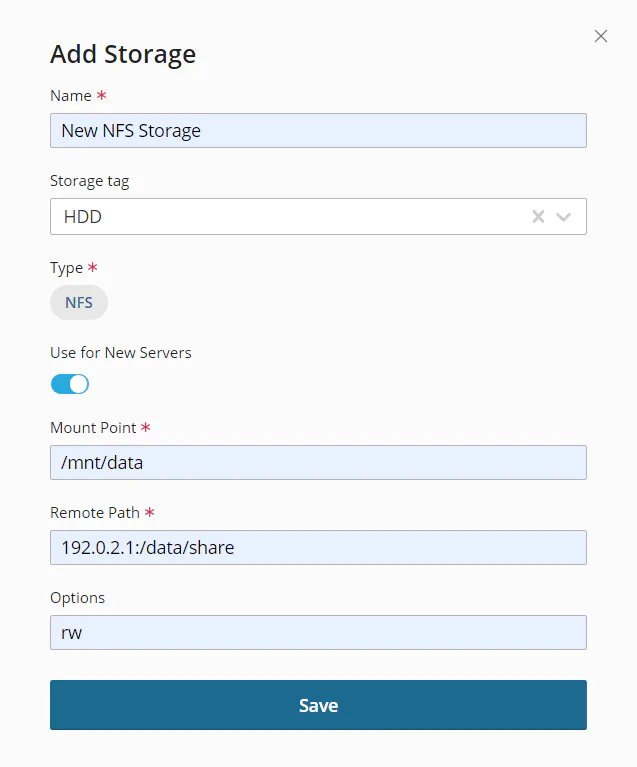
You have added NFS storage. You can now assign it to one or more compute resources.

Note:
You do not need to mount the NFS shared folder to each compute resource manually, because it will be mounted automatically when you attach NFS storage to the compute resource. If you share NFS storage between compute resources, you cannot stop creating servers on one particular compute resource. At the moment, disabling Use for New Servers affects all compute resources the storage was assigned to.