Title here
Summary here
Go to High Availability > Activities to view all past and ongoing evacuation events. These include moves to a healthy compute resource after a failure and moves back to the original compute resource after recovery.
Each row represents one evacuation event: one compute resource whose failure triggered a recovery. Expand a row to view the migration status for individual virtual servers in that event.
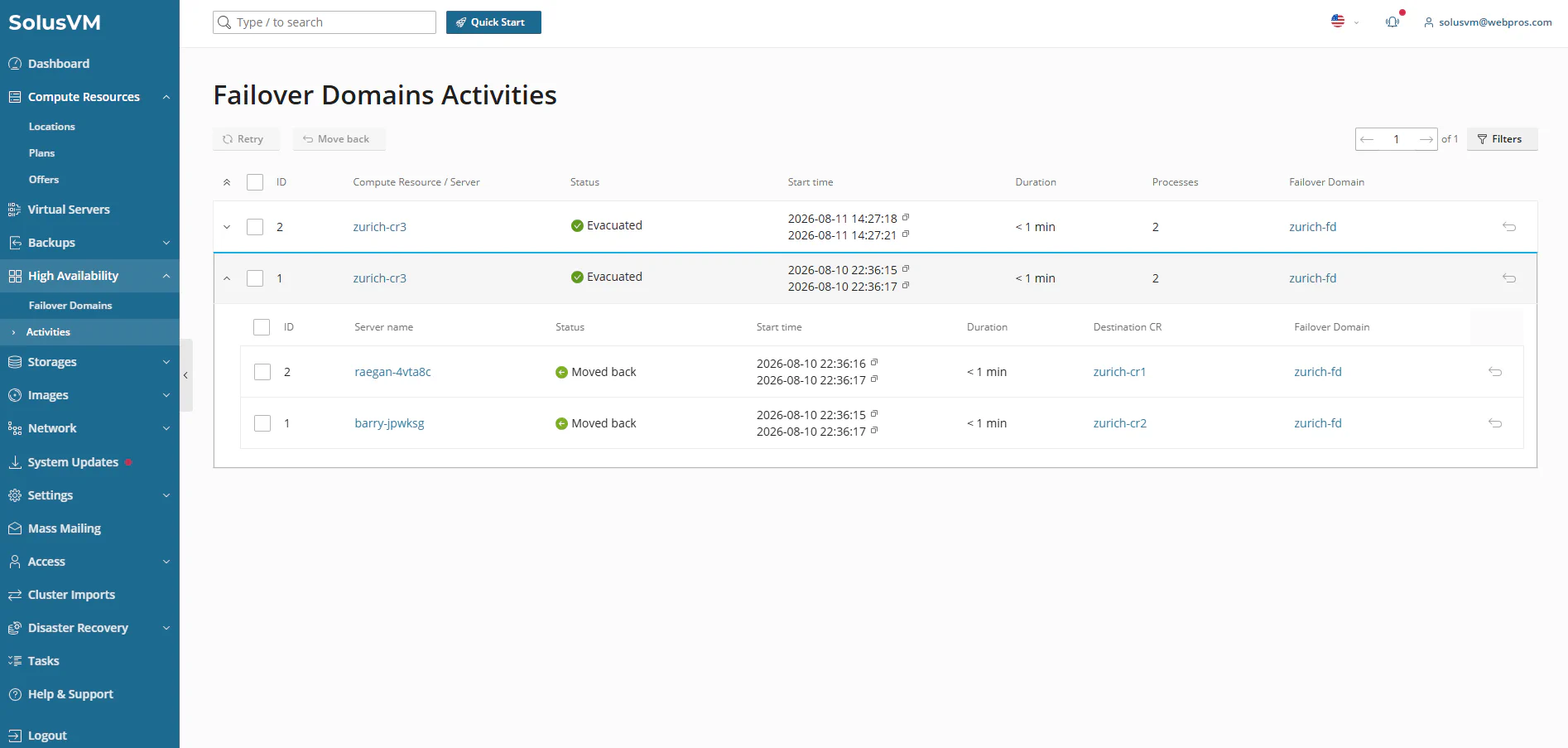
The event row shows the following information:
| Column | Description |
|---|---|
| ID | Unique identifier for the evacuation event. |
| Compute Resource / Server | The source compute resource whose failure triggered the event. |
| Status | The event status. When an event finishes with failed or cancelled virtual servers, a second line shows how many. See Event Statuses. |
| Start time | Timestamp when the system started the event. After the event finishes, a second line shows when it ended. |
| Duration | Elapsed time for the event. |
| Processes | The number of virtual servers included in the event. |
| Failover Domain | The failover domain associated with the event. Click the name to open the activities of that failover domain. |
Expand an event row to see the following information about each virtual server:
| Column | Description |
|---|---|
| ID | Unique identifier for the process. |
| Server name | The virtual server that the system is recovering. |
| Status | The recovery status of this virtual server. See Per-Server Statuses. |
| Start time | Timestamp when the recovery of this virtual server started. |
| Duration | Elapsed time for this virtual server. |
| Destination CR | The compute resource on which the system recreated this virtual server. |
| Failover Domain | The failover domain associated with the event. |
Note:
When you open the Recent activities interface for a single failover domain, SolusVM hides the Failover Domain column because all events belong to that domain.
An event status describes the evacuation of an entire compute resource. You can filter the list by any of these statuses.
| Status | Description |
|---|---|
 Pending Pending | The evacuation event is in queue and waiting to begin. |
 Running Running | Evacuation is in progress. |
| Running with errors | Evacuation is in progress, and one or more virtual servers have already failed. |
 Evacuated Evacuated | The system evacuated all virtual servers successfully. |
 Partially evacuated Partially evacuated | The system successfully evacuated some virtual servers, but not others. |
 Not evacuated Not evacuated | The system did not evacuate any virtual servers. |
| Failed | The system evacuated none of the virtual servers in the event. A second line shows the counts. |
 Cancelled Cancelled | The system cancelled the event. For example, the source compute resource came back online before the evacuation started. |
The following statuses describe the recovery of an individual virtual server:
| Status | Description |
|---|---|
| Pending (Evacuation) | The evacuation event is in queue and waiting to begin. |
| Evacuating | The system is recreating the virtual server on the destination compute resource. A second line shows the progress as a percentage. |
| Evacuated | The system recreated the virtual server on the destination compute resource successfully. If the virtual server was running before the failure, the system also started it. |
| Not evacuated | The system could not recover the virtual server. Point to the status to see the reason for the failure. |
| Cancelled | The system cancelled the recovery of this virtual server before it ran. For example, the source compute resource came back online before the evacuation started. |
 Pending (Moving back) Pending (Moving back) | The moving back event is queued and waiting to begin. |
 Moving back Moving back | A moving back migration is in progress. |
 Moved back Moved back | The system successfully moved back all virtual servers to their source compute resource. |
 Not moved back Not moved back | The move back failed. The virtual server continues to run on the destination compute resource. |
Use the following actions to retry failed evacuations or move virtual servers back to their source compute resource after recovery:
You can configure one or more webhook URLs to receive notifications when a High Availability event starts or completes.
HA supports the following webhook events:
Read the Using Event Handlers documentation to configure webhooks.